Stop restarting screen shares
Follow the pointer across only the displays you allow, while viewers keep seeing one stable window.
01 Top Donor
Help keep CursorCast free and earn the featured community placement.
Single confirmed payments only · No cumulative top-ups · Ties keep the earlier leader
Private beta · macOS + Windows
Move between approved displays and applications without restarting your recording—or exposing the windows you choose to protect.
Free recordings include the current approved Top Donor logo · Mac signed + notarized · Windows self-contained x64 tester
01 Continuous recording
02 Protected applications
03 Stable live sharing canvas
Why CursorCast
Follow the pointer across only the displays you allow, while viewers keep seeing one stable window.
Uncheck sensitive applications. If one appears over your shared display, CursorCast masks the space it occupies.
Both desktop betas can save a local MP4, publish a stable CursorCast Live window to a meeting app, or send the same protected pixels to both.
The real recorder
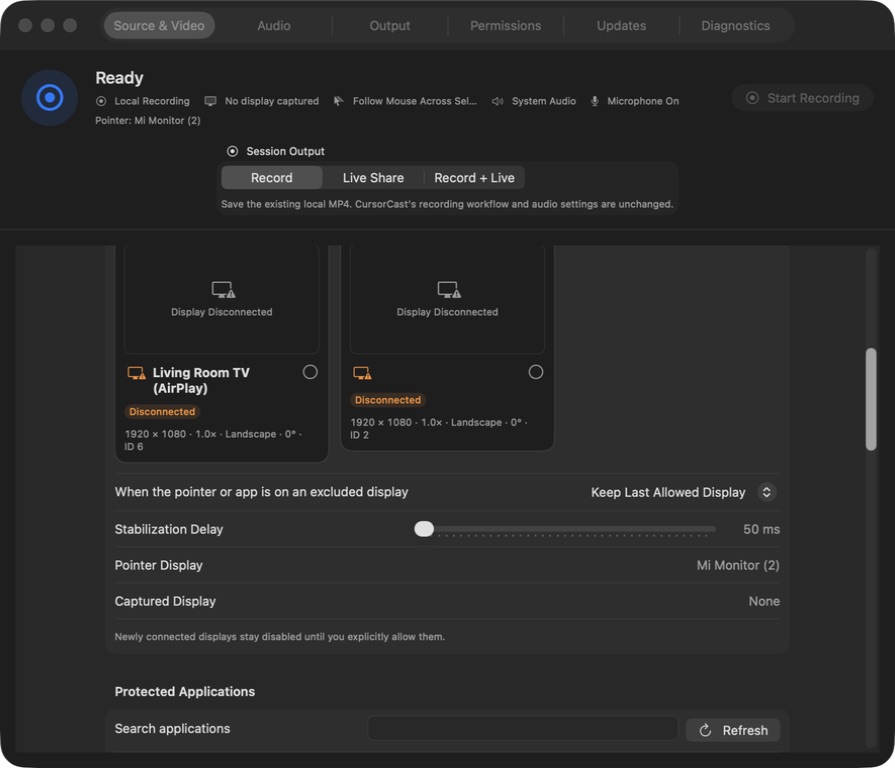
The macOS and Windows betas share the same recorder-first structure. Choose the capture boundary, allowed screens, protected applications, resolution, frame rate, and audio from one control window. Shown here: the current macOS interface.
Three clear steps
Allow specific displays or apps, pick a single window, and uncheck anything that must be masked when it appears.
Move through approved displays and applications while CursorCast keeps one stable output canvas and one local MP4.
In Discord, Meet, Zoom, or Teams, choose CursorCast Live from the normal window-sharing picker on Mac or Windows.
01 / FOLLOW
CursorCast changes the source only inside your display allowlist and keeps the output canvas consistent.
02 / PROTECT
The mask is applied before frames reach the recording or CursorCast Live output.
03 / OUTPUT
Record, Live Share, and Record + Live are available on both platforms. Windows live output is video-only, so your meeting app continues to own meeting audio.
04 / AUDIO
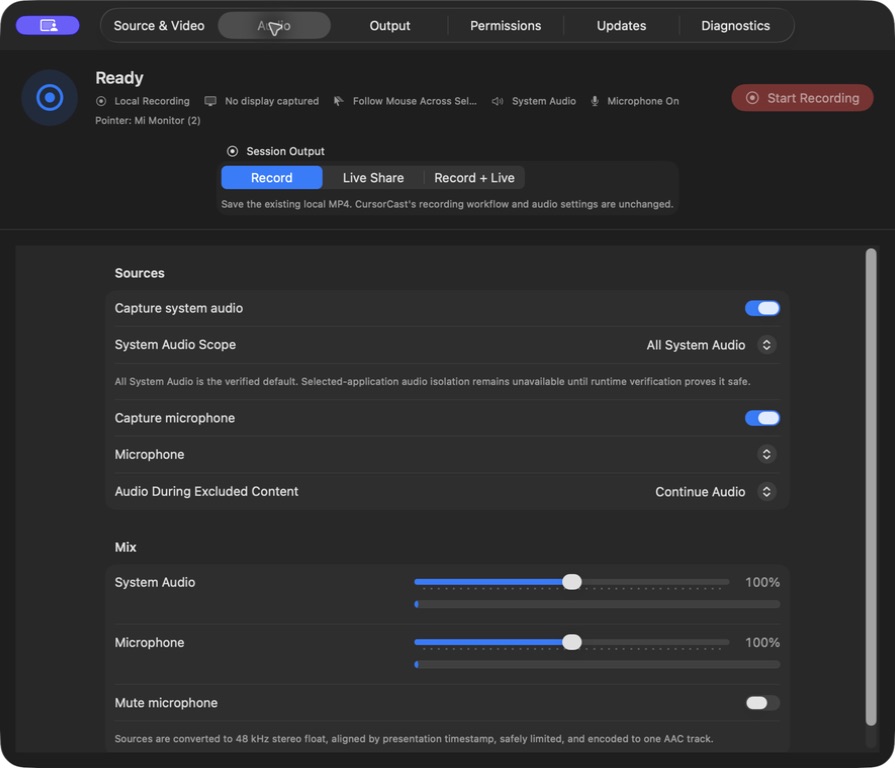
System audio and microphone settings remain explicit on both platforms. The experimental Discord system-audio relay is macOS-only.
Useful when
Privacy model
Video capture, privacy masking, compositing, and MP4 output happen on your computer. The beta recorder does not require a CursorCast account.
Your recording stays on your computer in the folder you choose.
Capture sources, protected apps, audio, and output mode are selected before Start.
When protected-window geometry cannot be resolved safely, CursorCast masks the full display.
Top Donor outbound clicks are deduplicated by a keyed one-way digest of placement, day, and network address. Raw addresses are not stored; deduplication records expire after seven days.
Beta boundaries
Desktop private beta
Both downloads contain the complete app. Testers do not need Xcode, Visual Studio, .NET, or any build tools.
ca2c3849fbb2cefbd57bc9b9d5d5d5d0092e9e4ae9759f2da0726dd5b6357c7aa0db011647544ba8d56aabcb074dd2ce5cbd7ce47e9fb77fe165b49a56ddb2b7Quick answers
No. Keep using your meeting app. On Mac or Windows, choose the separate CursorCast Live window when you share your screen.
Yes. Local recording remains the default. Live Share and Record + Live are optional session modes.
No. Protected Applications is a video privacy control. Configure system audio separately in the Audio tab.
The Windows tester installer is not Authenticode-signed yet, so SmartScreen may warn. Confirm the published SHA-256 before installing; production signing remains a release gate.
Use the Updates tab in CursorCast. macOS verifies Sparkle and Apple signatures. Windows checks the hosted beta manifest and verifies the installer size and SHA-256 before you explicitly launch Setup.
CursorCast is community-funded. Free recordings use the current approved Top Donor logo as a watermark. A signed CursorCast manifest prevents an arbitrary website or network response from replacing that logo, and each recording keeps the same logo from start to finish.
The highest single confirmed USD donation leads. Donations never accumulate, a tie does not replace the earlier leader, and the next donation must be at least $1 higher. Refunds, partial refunds, disputes, and chargebacks make that payment ineligible.
The recorder and three output modes are available for testing, while broader meeting-app compatibility and production Windows signing are still being validated.